
Why asset tracking needs live operational data
Asset tracking becomes difficult when teams depend on manual updates, delayed spreadsheets, or disconnected field reports. A location, inventory count, temperature reading, or equipment status can be correct when it is entered and already stale by the time a manager uses it.
For warehouses, utilities, smart city teams, agriculture operations, and field service organizations, the goal is not only to know where an asset is. The goal is to turn sensor activity into reliable operational data that can be used in the systems the business already depends on.
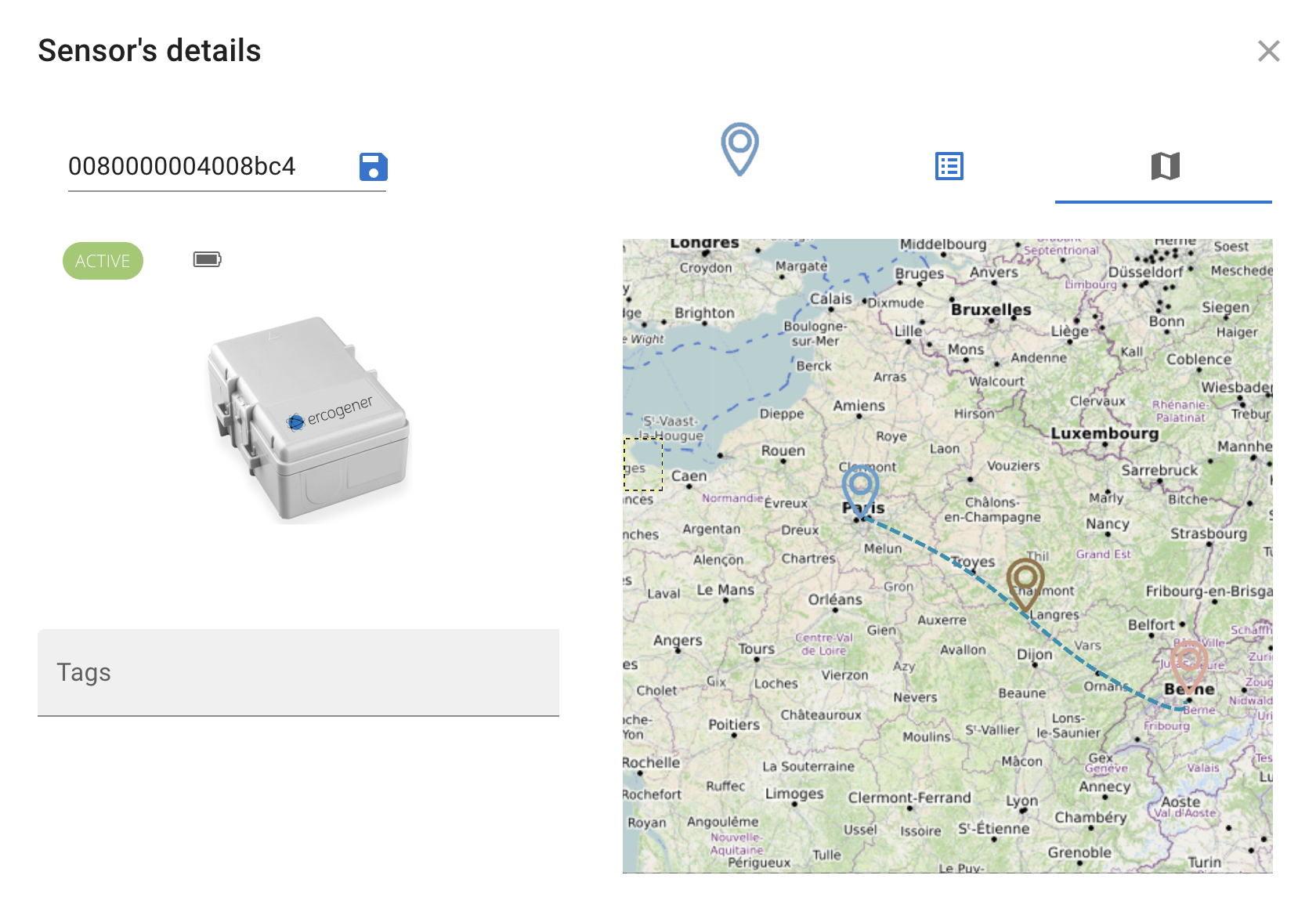
What an IoT asset tracking platform should include
- Support for the wireless networks your assets actually need, including LoRaWAN for long-range, low-power deployments and cellular connectivity for mobile or wide-area scenarios
- A simple way to onboard gateways, sensors, and tags without rebuilding the software stack around every hardware choice
- Real-time maps that connect asset location with status, telemetry, and operational context
- Data models that translate raw payloads into business-friendly measurements
- Integration paths for dashboards, GIS tools, warehouse software, environmental systems, and other line-of-business applications
When LoRaWAN fits asset tracking
LoRaWAN is a strong fit when assets are spread across buildings, campuses, industrial sites, municipalities, or agricultural areas and each device only needs to send small messages. It can support long-range communication, low-power sensors, and deployments where battery life matters.
For teams validating the network layer, AWS IoT Core for LoRaWAN is a useful reference because it explains gateway and device onboarding, LoRaWAN fleet monitoring, and common use cases such as asset tracking, connected buildings, and equipment monitoring.
That makes LoRaWAN useful for equipment status, environmental monitoring, parking occupancy, waste collection, utility infrastructure, cold storage, and other use cases where live signals are more valuable than manual inspection rounds.
When cellular support matters
Cellular connectivity becomes important when assets move beyond one local gateway network or when the deployment needs broader coverage from the start. A mixed fleet may include LoRaWAN sensors inside facilities and cellular devices on mobile equipment, vehicles, remote locations, or customer sites.
An IoT asset tracking platform should make that mixed environment manageable. Teams should not need separate operational views just because one device uses LoRaWAN and another uses cellular connectivity.
Hardware selection should also be checked early. AWS maintains an AWS Partner Device Catalog where teams can review gateways and developer kits qualified for AWS IoT Core for LoRaWAN.
Why sensor data models matter
Tracking an asset is only useful when the incoming data has meaning. Raw device payloads need to become values that people and software can understand: location, temperature, humidity, occupancy, fill level, battery status, signal quality, or another operational measurement.
Device Explorer is positioned around attached data models for LoRaWAN devices, multi-network support, and real-time monitoring. That combination helps teams move from device connectivity to business-ready telemetry faster.
How Device Explorer supports asset tracking workflows
Device Explorer helps teams onboard LoRaWAN and cellular sensors, inspect device details, map telemetry, and route live measurements into operational workflows. Instead of treating asset tracking as a standalone dashboard, it can support the broader path from connected device to usable business data.
That is especially useful when the asset tracking workflow needs to connect with warehouse visibility, smart city maps, environmental monitoring, energy oversight, or software vendor integrations.
For smart city asset tracking and infrastructure monitoring, the LoRa Alliance also publishes market and deployment updates that can help teams understand where LoRaWAN is being used at scale.
Start with a focused pilot
The best IoT asset tracking project usually starts with a narrow operational question: which assets are missing, which conditions are out of range, which locations need attention, or which manual reports should disappear first.
From there, teams can choose the right sensors, connect the right gateways, validate live data quality, and expand only after the workflow proves useful. Device Explorer supports that path with a free account for the first 10 devices, then device-based pricing when the deployment grows.